First, let’s talk about LinkedIn’s built-in profile-to-PDF function. While it’s convenient, it doesn’t create a resume that’s recruiter-friendly or optimized for Applicant Tracking Systems (ATS). The default two-column format LinkedIn generates is tough for systems like Workday to parse, meaning your data isn’t always captured correctly. Take a look at the example below of Simon Sinkeks’ LinkedIn resume:
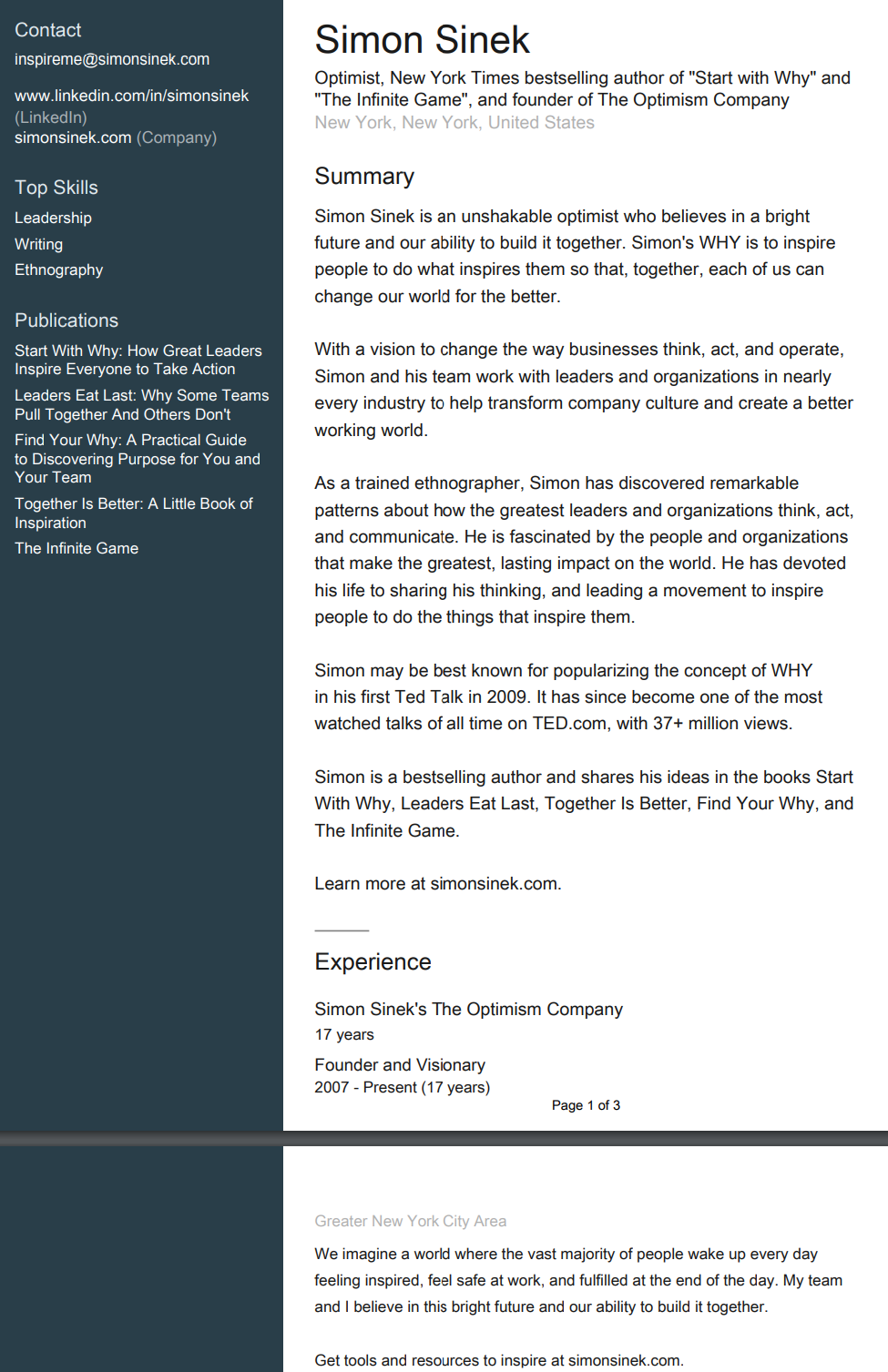
As you can see, Simon’s PDF has many issues:
- It’s over 1 page, or roughly 3 pages long!
- Skills – Very few, not complete.
- ATS-Friendly Format – The two-column layout is too limiting, and critical data gets overlooked.
Another issue is that you shouldn’t be updating your LinkedIn profile every time you apply for a new job. Each resume should be tailored to the specific role you’re hoping to land. That means including the right keywords and emphasizing relevant experience for each job description. Updating your LinkedIn every time isn’t practical.
Lastly, LinkedIn’s PDF feature doesn’t allow for easy edits. While most resumes are eventually submitted in PDF form, you usually need to make adjustments before they’re ready for submission. LinkedIn’s static format makes this difficult.
How CVGist Solves These Issues
So, how can you leverage the valuable information in your LinkedIn profile without these limitations? That’s where CVGist comes in. We’ve developed a Google Chrome Extension that takes your LinkedIn profile and turns it into an AI-generated resume, which you can download as an editable Microsoft Word document, all for free. This way, you can use the data you’ve already input on LinkedIn while having the ability to make necessary edits for each job application.
Let’s see it in action. We downloaded the CVGist extension, navigated to Simon Sineks’ LinkedIn profile, clicked “Create Resume,” and within seconds, AI generated all the key sections, added some extra context, and provided a downloadable resume to Microsoft Word:

Here’s what we noticed:
- Skills – The AI populates the relevant skills for Simon Sinek.
- Additional Key Information – The AI fills in details like email, location, and more.
- ATS-Friendly Format – The resume now flows logically from top to bottom, making it easy for recruiters and systems to scan.
From here, you can download the resume in Word format and make any final adjustments that the AI may have missed or exaggerated. It’s a great first step toward creating a solid resume tailored for job applications, which is why we’ve made this tool free. We’re doing a lot of the work you’d otherwise need to do manually when updating your LinkedIn profile for a job.
Taking It to the Next Level
How can we make your resume even better? With a standard or pro membership at CVGist, you can use your LinkedIn profile to tailor your resume for specific job applications. Let’s take Simon Sineks’ resume again, but this time, we’re applying for a board position at a technology company looking for someone who’s built a company from scratch. The AI takes this new context along with the bio and creates a tailored resume

Now, the resume highlights the key skills and experiences relevant to the job, ensuring that recruiters or ATS systems pick up on what matters most.
In Conclusion
At CVGist, we understand how tough the job market is right now, and we’re committed to giving job seekers the best tools and resources to help land their next role. Check out the resources below to get started:
- CVGist LinkedIn Profile to AI Resume
- CVGist Content Page (Free Resume Templates & More)
- What is my Career Path?
- CVGist AI Resume Builder
For more updates, follow us on:


Leave a Reply